Simplify 2D
Simplifies small curves in Archicad 2D details, such as window and curtain-wall details imported from DWG. Complex profiles and library parts built from them then have far fewer polygons.
In the studio, use the copy on the server, in Úteis › Python Scripts (see Install). The download is for reference or for working outside the studio.
| Version | 1.1 · November 2026 |
| Requires | Archicad 29, Tapir 1.8, Python 3 (standard library only) |
| Platforms | macOS, Windows |
| Works on | Hatches, lines, arcs, polylines, splines in the open view |
| Result | A new worksheet; the original drawing is not changed |
What it does
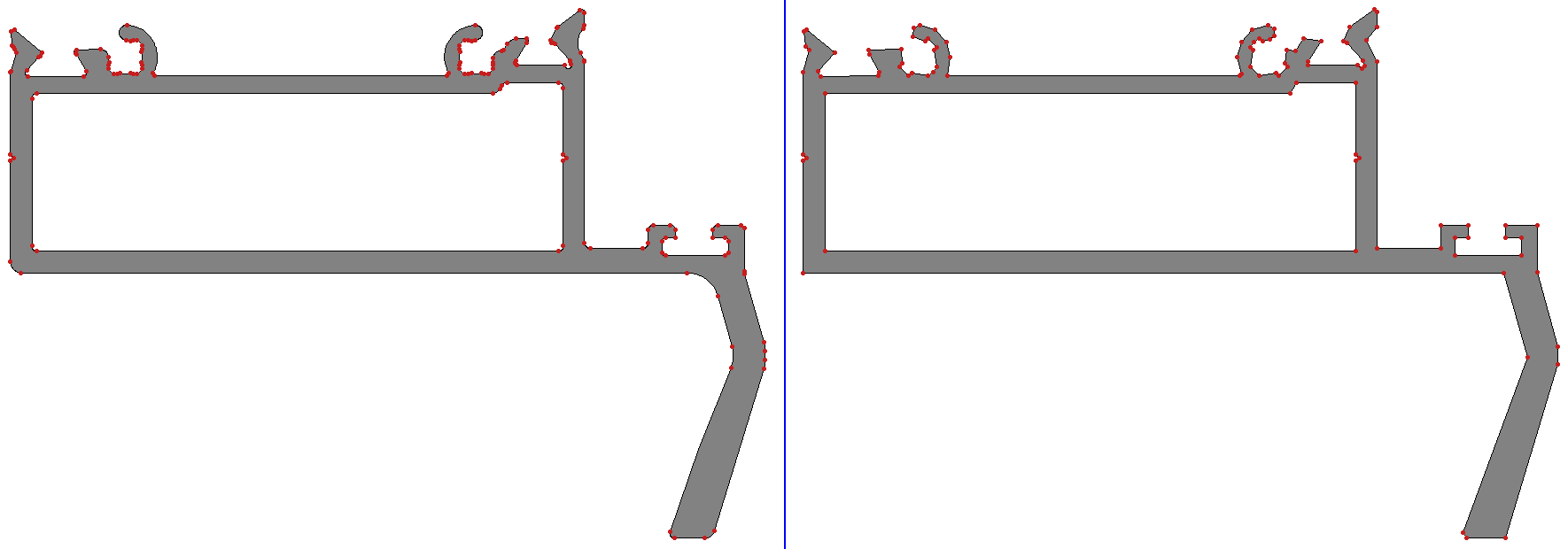
Left: the original hatch, with each red dot a vertex. Right: after Simplify 2D, with the Standard preset.
- Fillets become sharp corners. A clean fillet with radius up to 5 mm and a turn up to 100° is replaced by the intersection of the two lines it joins.
- Other small curves become straight segments. Hooks, rounded tips and gasket serrations are drawn as straight segments that stay within 0.2 mm of the original shape.
- Hatches lead. Lines lying on a hatch outline are deleted and redrawn from the cleaned hatch, as one polyline per outline by default. Hatch and lines then match exactly.
- Loose linework follows the same rules. This covers lines, arcs, polylines and splines that are not on a hatch outline.
- Nearly straight large arcs become straight lines. This applies only when the difference is under the tolerance.
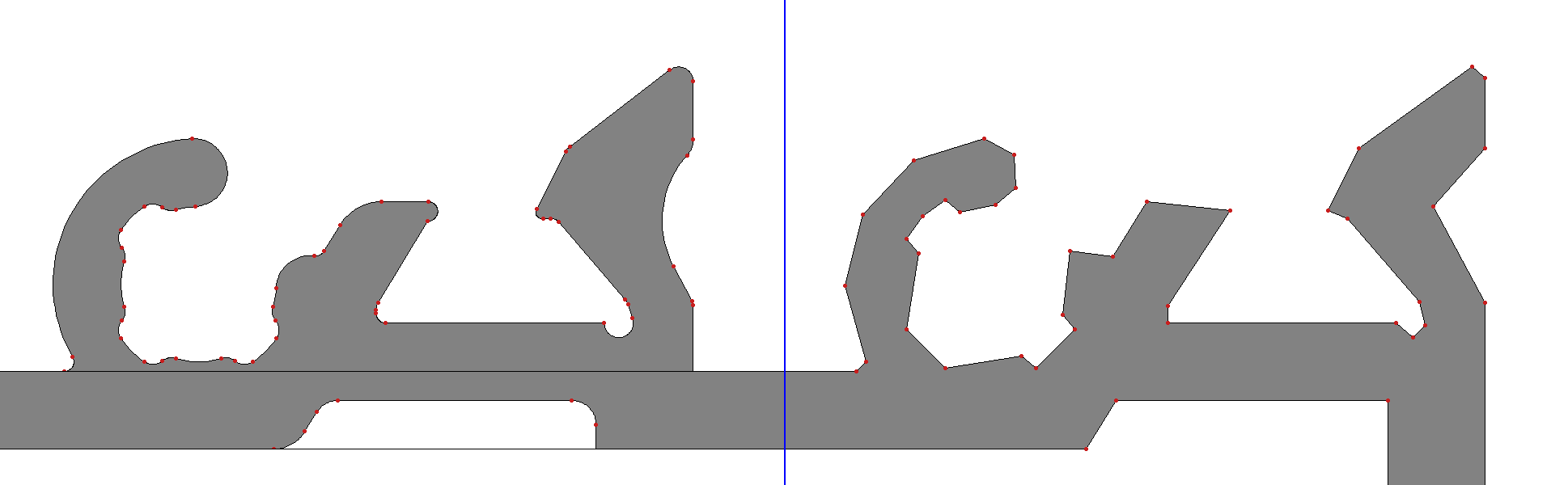
Detail: the C-shaped hooks keep their shape, and the fillets become corners.
Where the result goes
The result is drawn in a new worksheet, at the same coordinates and on the same layers as the original. The original drawing is not changed.
- In the Navigator the worksheet appears as Simplify 2D followed by the name of the view it came from: the worksheet, detail or section name, or, for the floor plan, the story name (the project name if the story has none).
- The worksheet gets copies of the hatches, lines, arcs, polylines and splines the script works on. Texts, dimensions, labels and objects are not copied.
- Splines are copied as smooth curves through the same points, so they can differ slightly from the original.
- To undo, delete the worksheet.
If a worksheet with the same ID and name already exists, the script asks:
| Choice | Effect |
|---|---|
| Replace | Deletes the hatches, lines, arcs, polylines and splines in that worksheet and draws the new result there. Anything else you added to it (texts, dimensions) stays. Its place in the Navigator, and any drawing placed from it, are kept. |
| New | Creates another worksheet, with a numbered ID: Simplify 2D 2, Simplify 2D 3… |
| Cancel | Nothing is changed. |
To change the drawing itself instead, as version 1.0 did, set "output" to "in place" in the office settings. In that case save before running the script.
Install
- Install Tapir and Python.
- Connect to the Úteis shared folder on ServerTM.
- In Archicad, open Tapir › Tapir Palette, click + and select
Úteis/Python Scripts/simplify_2d.py(see Add the studio scripts).
Use
- Open the view with the details: a worksheet, a detail or a floor plan.
- Optional: select the elements to simplify.
- Press Esc so that no tool is active, then open Tapir › Tapir Palette, pick simplify_2d.py and click ▷.
- Answer the dialogs:
| Dialog | Choice |
|---|---|
| Scope | Selection (only what is selected) or Whole file. |
| Level | Fine, Standard or Coarse (see Presets). |
| Confirm | Shows what will change: number of elements, curves removed, circles, outlines. Apply or Cancel. |
| Worksheet exists | Only if it does: Replace, New or Cancel (see Where the result goes). |
| Done | The worksheet's name and how many elements it has, or a warning if anything was refused. |
Nothing changes until you press Apply. Don't touch Archicad while it runs; a whole file takes a few seconds. At the end the new worksheet is open and zoomed to fit.
Presets
| Preset | Max radius | Shape tolerance | Max fillet turn | When |
|---|---|---|---|---|
| Fine | 3 mm | 0.1 mm | 100° | Details at 1:1–1:2 where the gasket shape matters. |
| Standard | 5 mm | 0.2 mm | 100° | Default. Window and curtain-wall profiles. |
| Coarse | 8 mm | 0.5 mm | 110° | Profiles for 1:20 and smaller, or for 3D library parts. |
- Max radius: curves with a larger radius are not touched.
- Shape tolerance: how far the simplified segments may deviate from the original curve.
- Max fillet turn: fillets that turn more than this are treated as curves, not corners. This keeps hooks and rounded tips from collapsing.
Office settings
The presets and the settings below sit at the top of simplify_2d.py. Open the file in any text editor (TextEdit in plain-text mode, Notepad, VS Code), change the values and save.
The file in Úteis/Python Scripts/ is shared by the whole studio, so a change there applies to everyone the next time they run the script. Only the people who maintain the scripts can edit it. After a change, also replace the copy on this site (docs/downloads/simplify_2d.py) and publish the site again, so that both copies stay the same.
PRESETS = {
    "Fine":     {"radius": 3.0, "shape_tol": 0.1, "corner_max": 100},
    "Standard": {"radius": 5.0, "shape_tol": 0.2, "corner_max": 100},
    "Coarse":   {"radius": 8.0, "shape_tol": 0.5, "corner_max": 110},
}

SETTINGS = {
    "circles": "keep",          # small full circles: "keep" or "delete"
    "contours": "polyline",     # redrawn hatch outlines: "polyline" or "lines"
    "hatches_only": False,      # True: change hatches only, leave all lines alone
    "output": "worksheet",      # "worksheet" (new worksheet) or "in place" (change the drawing)
}
| Setting | Values | Effect |
|---|---|---|
circles |
"keep" · "delete" |
Full circles with a radius up to the preset's max radius, e.g. screw holes. |
contours |
"polyline" · "lines" |
How hatch outlines are redrawn. Polylines mean fewer elements and a cleaner selection. Choose lines if you will edit the outline by hand. |
hatches_only |
False · True |
True simplifies hatches only and leaves every line, arc and polyline as it is. |
output |
"worksheet" · "in place" |
Where the result goes: a new worksheet (default), or the drawing itself. |
Tip
Keep the quotes and commas exactly as they are. True and False start with a capital letter and have no quotes.
Run from the Terminal
Use the Terminal for testing, or for options the dialogs don't offer. Archicad must be open, with no tool active.
cd "/Volumes/Úteis/Python Scripts"
python3 simplify_2d.py                 # dry run: summary only, nothing changes
python3 simplify_2d.py --selection     # dry run on the selection only
python3 simplify_2d.py --apply         # apply (asks you to type YES in full)
python3 simplify_2d.py --help          # all options
On Windows use py instead of python3. When the worksheet already exists, the Terminal asks the same question as the dialog: type r (Replace), n (New) or c (Cancel).
All options
| Option | Default | Meaning |
|---|---|---|
--port N |
auto | Archicad instance port (searches 19723–19743). |
--selection |
off | Only the elements selected in Archicad. |
--apply |
off | Apply the changes. Without it, the run is a dry run. |
--output |
worksheet | worksheet or "in place". |
--dialogs |
auto | Use Archicad dialogs instead of the Terminal. |
--radius |
5 | Max radius of curves to simplify, in mm. |
--shape-tol |
0.2 | Max deviation when simplifying curves, in mm. |
--corner-max |
100 | Max turn of a fillet that becomes a corner, in degrees. |
--spike-r |
2 | Max distance from a new corner to the arc ends, in multiples of the radius. |
--spike |
10 | The same limit in absolute terms, in mm. |
--facet |
15 | Segment angle before simplification, in degrees. |
--circles |
keep | keep or delete small full circles. |
--contours |
polyline | Redraw hatch outlines as polyline or lines. |
--no-contours |
off | Don't redraw outline lines from hatches. |
--hatches-only |
off | Change hatches only. |
--contour-tol |
0.05 | Max distance from a line to a hatch outline, in mm. |
--coverage |
0.9 | Share of a hatch outline that must be drawn as lines for it to be redrawn. |
--tol |
0.02 | Tolerance for matching endpoints, in mm. |
--straight |
0.05 | Max deviation for a spline to count as straight, in mm. |
--select-skipped |
off | Dry run: select the skipped elements in Archicad. |
--show-partial |
off | Dry run: select hatches whose outline is only partly drawn. |
--report [file] |
off | Write a JSON report, by default simplify_2d_report.json. |
Troubleshooting
- "Archicad is busy…"
- A tool is active, a dialog is open or a selection is in progress. Press Esc in Archicad and wait; the script carries on by itself.
- "Archicad refused…" / some writes refused
- Usually caused by locked layers, elements in a hotlinked module, or, in Teamwork, elements reserved by someone else. Unlock them and run it again. With
"in place", if more than 10% of the changes are refused, the script stops before creating or deleting anything. - Some hatch outlines were not redrawn
- An outline is redrawn only when at least 90% of it is drawn as lines. Run a dry run with
--show-partialin the Terminal to select those hatches and check them by hand. - A shape looks wrong
- Run it again with Fine and choose Replace. If it is still wrong, keep the file and tell the person who maintains the script.
- The Navigator shows Simplify 2D 2, 3…
- You chose New, or an older version of the script ran. Delete the extra worksheets.
- Nothing happens / "no Archicad found"
- Check that Archicad is open with a project, and that Tapir is loaded.
Changelog
| Version | Date | Changes |
|---|---|---|
| 1.1 | Nov 2026 | Result in a new worksheet (Replace / New if it exists), zoom to fit at the end. |
| 1.0 | Nov 2026 | First studio release: dialogs, presets, office settings. |